
It is 11 p.m. A parent visits a coaching institute's website and asks, "Is there a weekend batch for Class 10 maths, and what are the fees?" Nobody is in the office. By morning, the parent has already booked a demo class somewhere else.
That lost enquiry is the problem an AI customer support and sales assistant solves. It answers at 11 p.m. It asks the parent a couple of questions. It books the demo and tells your counsellor, who calls back at 9 a.m. with the details already in hand.
This guide explains, in plain terms, what such an assistant does, how to build one, and what real companies learned doing it, including the ones that got it wrong. At Vidyayatan we build custom AI systems like this for businesses.
Have an idea for an AI assistant? Talk to Vidyayatan's AI experts.
What is an AI customer support and sales assistant?
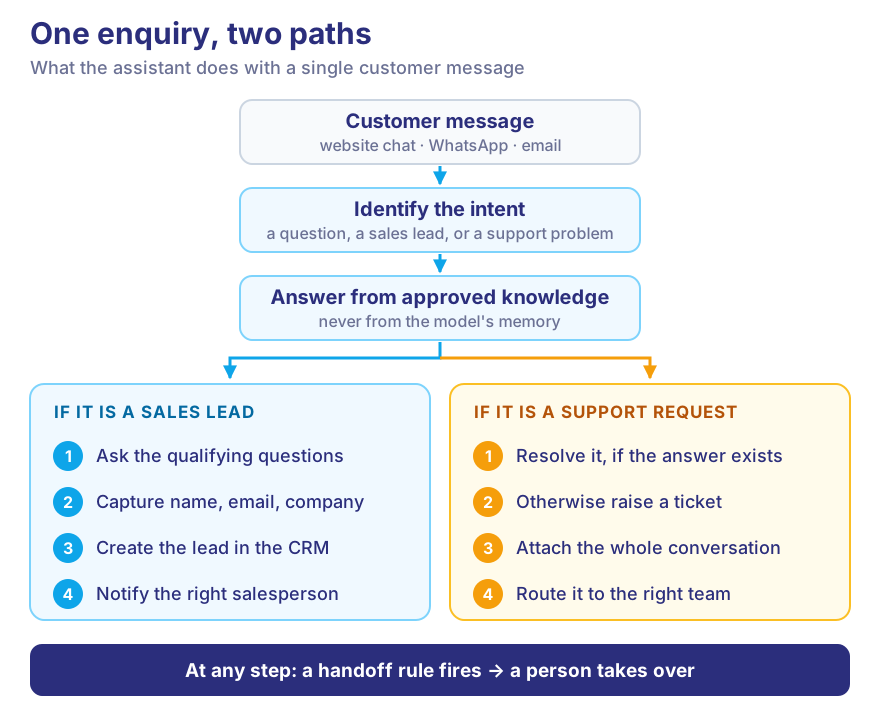
It is a chat assistant on your website, WhatsApp or email that does two jobs:
- Support: answers customers' questions and solves simple problems.
- Sales: spots people who want to buy, asks them a few questions, and passes them to your sales team.
When a question is too hard, it hands the chat to a person, along with everything said so far.
A simple example. A customer types: "What does your enterprise plan cost?"
An ordinary chatbot pastes a link to the pricing page. An AI assistant does more:
- It understands this is someone who might buy.
- It gives the approved price range.
- It asks, "How big is your team, and when do you want to start?"
- It takes their name and work email.
- It adds them to your CRM (the system where you keep customer records).
- It messages the right salesperson.
All of that happens in about a minute.
Why businesses build one
Slow replies lose sales
In a Harvard Business Review study of 2,241 US companies, only 37% replied to a web enquiry within an hour. Almost a quarter never replied at all. The average reply took 42 hours. Businesses that replied within an hour were nearly seven times more likely to have a real conversation with the buyer.
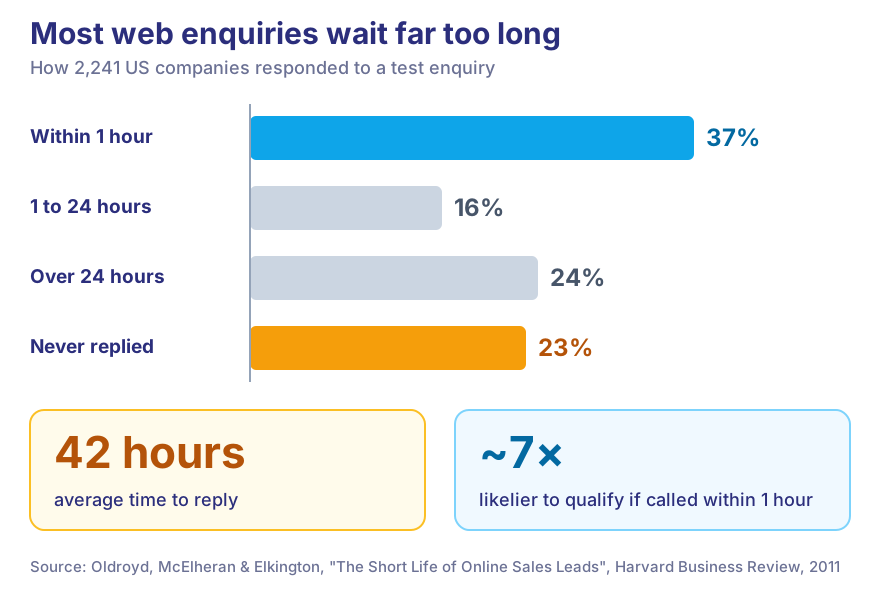
That study is from 2011. Customers have not become more patient since.
Your team answers the same questions all day
"Where is my order?" "What is your refund policy?" "Do you deliver to Pune?" Each answer takes a few minutes. Hundreds of them take up a whole day, while the difficult cases wait.
The answers are spread across different systems
Prices are on the website, policies are in a PDF, orders are in one system and customer history is in another. An assistant connected to all of them finds the answer in seconds.
Real examples: what worked
These are real companies, with figures from their own announcements or trusted reporting.
-
Air India. Its assistant, AI.g, launched in May 2023. By late 2024 it had handled nearly 4 million customer queries, 97% of them without a person, according to Microsoft's case study. It handles routine questions such as baggage allowance, flight status and check-in.
-
Octopus Energy (a UK electricity supplier). In May 2023 its CEO said AI was answering customer emails and doing the work of about 250 people. Customers rated the AI-written emails 80% satisfactory, against 65% for emails written by staff.
-
Klarna (a payments company). In its first month, its assistant handled 2.3 million chats, two-thirds of all its customer service chats. Klarna said the average time to solve a problem fell from 11 minutes to under 2.
-
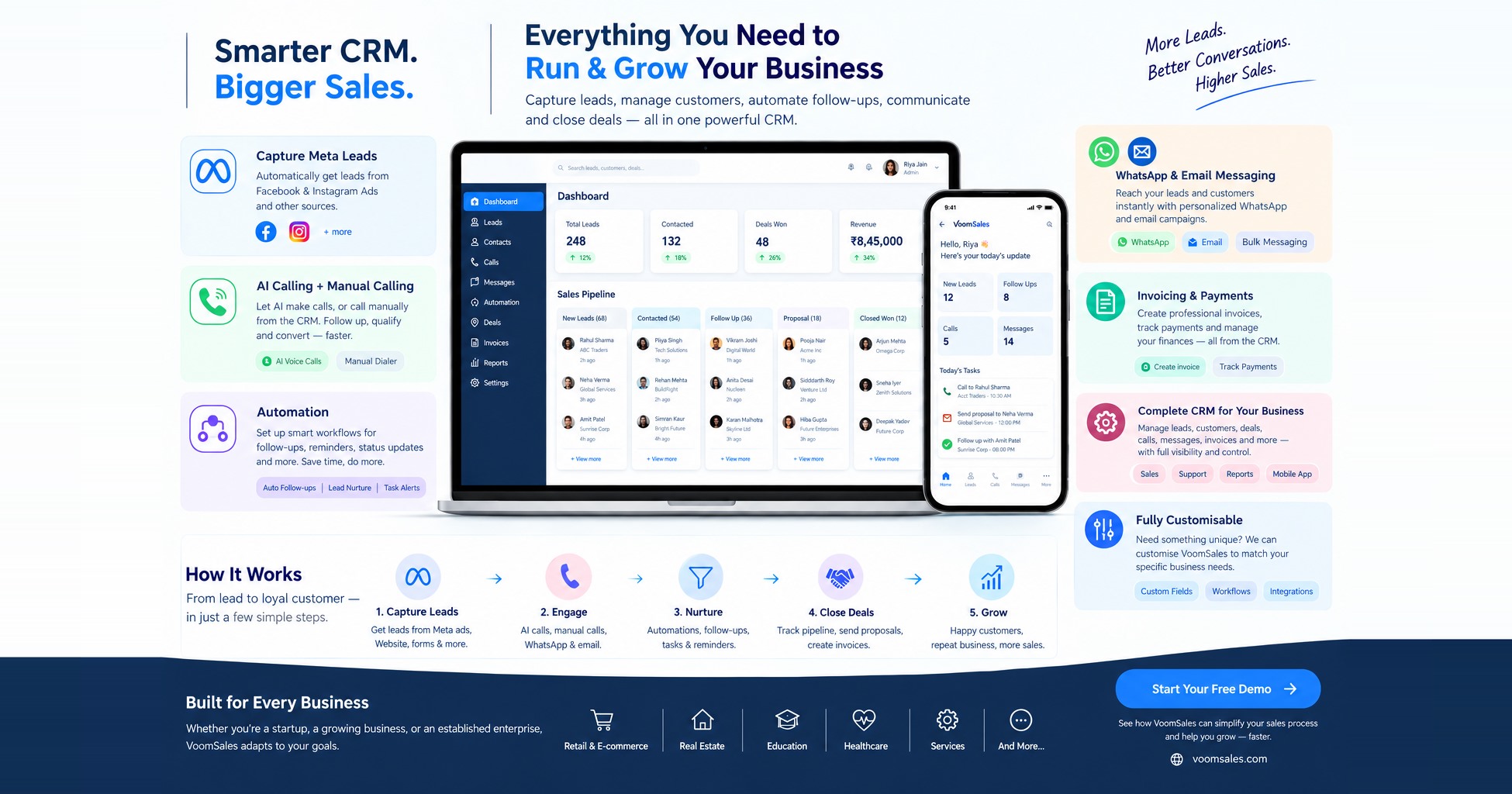
Voom Sales (a sales CRM for Indian teams, built by Vidyayatan). Voom Sales puts the CRM, AI voice calling and WhatsApp in one product. When a lead comes in from a Facebook or Instagram ad or a website form, its AI agent can call them in any of 10 Indian languages, including Hindi. It asks the qualifying questions, saves the answers in the CRM and transfers interested leads to a salesperson. Follow-ups and reminders run automatically. This is the idea behind an AI sales assistant: no lead is left sitting in a spreadsheet.
Keep reading, though. Klarna appears again in the list of what went wrong.
What the assistant can do
- Answer questions from your approved FAQs, product details and policies.
- Qualify leads by asking what the customer needs, how big their team is and when they want to start.
- Suggest the right product, plan or course.
- Collect details such as name, email, phone and company.
- Book meetings straight into a salesperson's calendar.
- Raise support tickets for problems it cannot solve.
- Hand over to a person when needed. This matters most. The aim is not to make AI answer everything.
How to build an AI customer support and sales assistant
Step 1: Pick one goal
"Better customer service" is too vague. "Reply to every website enquiry within five minutes" is a goal you can measure. Start with one.
For example, a sales team using Voom Sales might set this goal: "Every new lead from a Facebook ad gets an AI call and its qualifying questions answered on the same day." It is clear, and you can check it every week.
Step 2: Gather the information it is allowed to use
Your website, FAQs, price lists, policies and product documents. Check that all of it is correct and up to date. An assistant repeats whatever you give it. If your refund policy PDF is from 2022, it will quote the 2022 policy.
Step 3: Choose the AI model and set it up
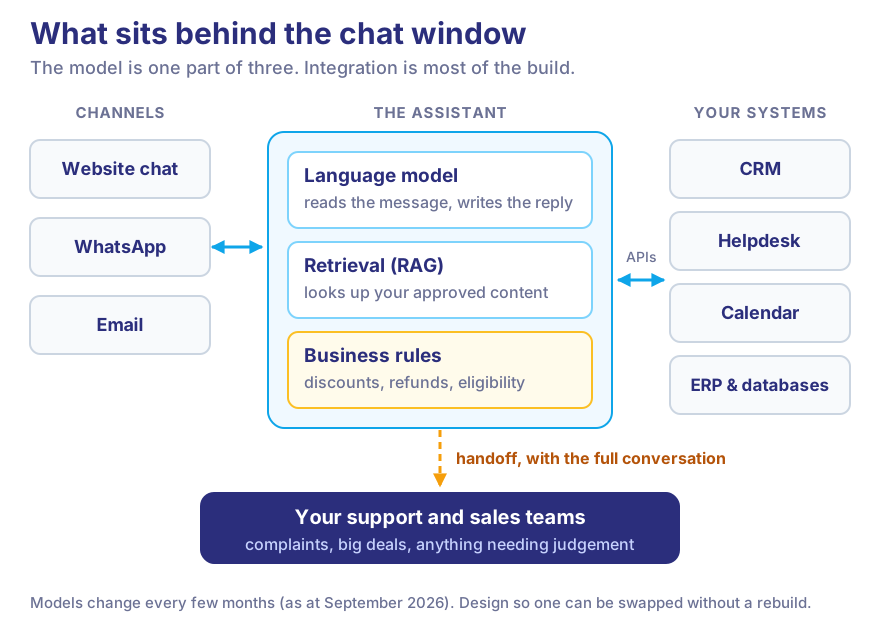
The assistant uses an AI language model, the same kind of technology behind ChatGPT. We set it up so that it looks up the answer in your own documents first, then replies. It does not answer from general knowledge. (The technical name for this is retrieval-augmented generation, or RAG.)
Some decisions should never be left to AI: discounts, refunds, who qualifies for an offer. Those follow fixed business rules. AI models change every few months (as at September 2026), so we build the system so the model can be swapped later without starting again.
Step 4: Plan the conversations
For each type of message, decide how the chat should end: a lead in the CRM, a support ticket, a booked call, or a handover to a person. A chat with no clear ending just goes round in circles.
Step 5: Connect it to your systems
CRM, helpdesk, calendar, WhatsApp, email, order system. This is usually the biggest part of the work. A sales assistant whose leads never reach your CRM is just a form that talks.
Step 6: Decide when a person takes over
Write these rules down before you launch.
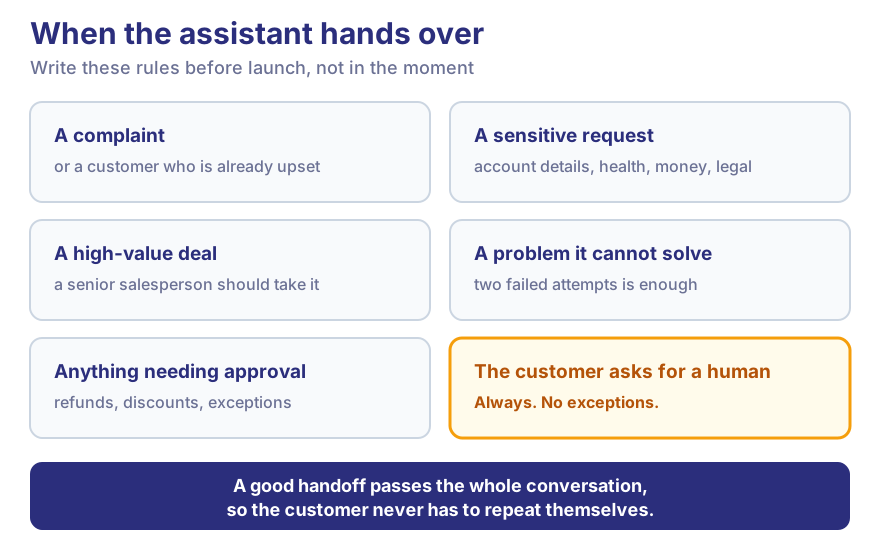
Customers care about this. In a Gartner survey of 5,728 customers, 64% said they would rather companies didn't use AI for customer service. Their biggest worry was that it would make a real person harder to reach.
Step 7: Test it with real questions
Use real enquiries from the last few months, not made-up ones. Check that the answers are correct, leads are captured and handovers happen. Then try to trick it, the way a mischievous customer would.
Step 8: Start small and keep improving
Launch on one channel, such as your website. Read the chats every week. Each time it says "I don't know", add the missing answer. That is how it gets better.
Real examples: what went wrong
Each of these mistakes is easy to avoid, which is why they are worth knowing about.
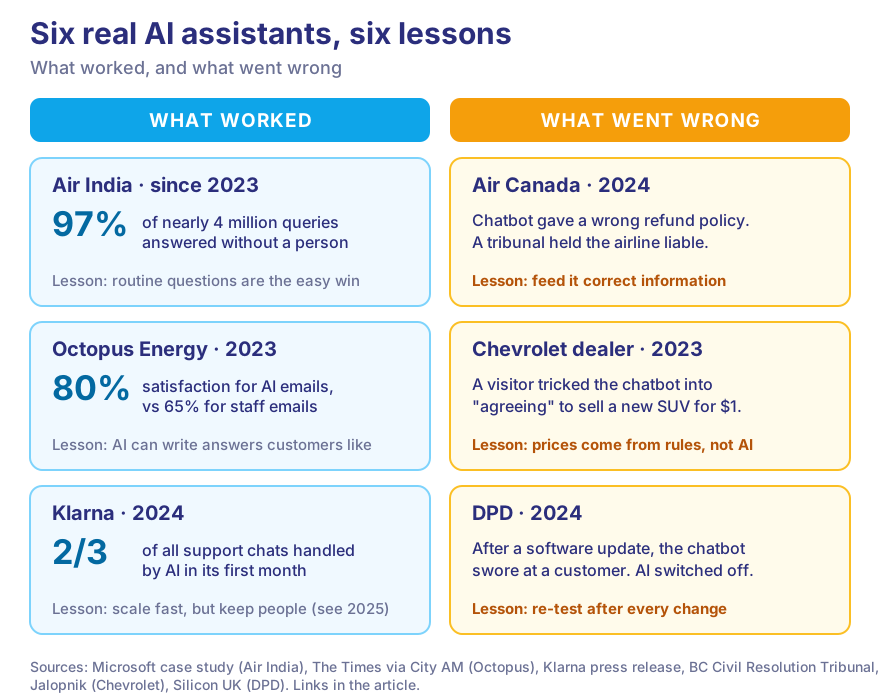
- Giving it wrong information: Air Canada, 2024. Its website chatbot told a grieving customer he could claim a bereavement discount after flying. The airline's actual policy said no. Air Canada argued the chatbot was responsible for its own words. A Canadian tribunal disagreed: the chatbot is part of your website, so you are responsible for what it says.
- No rules on what it can promise: a Chevrolet dealership, 2023. A visitor told the dealer's chatbot to agree to anything. It then "agreed" to sell a new Tahoe SUV for $1. Prices and discounts should come from fixed rules, never from the AI.
- Not testing after changes: DPD, 2024. After a software update, the parcel company's chatbot swore at a customer and called DPD "the worst delivery firm in the world". DPD switched the AI off. Re-test after every update.
- Cutting costs too far: Klarna, 2025. In May 2025 Klarna's CEO said cost had been "a too predominant evaluation factor" and quality had suffered. Klarna began hiring people again so customers could always reach a human.
- Not measuring results. If you don't track what the assistant solves and where it fails, you can't improve it.
AI customer support vs AI sales assistant
| AI customer support | AI sales assistant |
|---|---|
| Answers questions | Finds serious buyers |
| Solves common problems | Collects contact details |
| Creates support tickets | Suggests products or services |
| Searches your help articles | Asks what the customer needs |
| Passes problems to your team | Books meetings and follow-ups |
You can build them separately. We usually combine them into one AI customer support and sales assistant, because customers don't separate their questions. Someone who asks "where is my order?" today may ask for a bulk discount tomorrow.
Key features to include
Natural conversation · answers from your own information · lead questions · CRM connection · handover to a person · chat history · reports · customer login where needed · access controls for your team · website and WhatsApp · connections to your other software · security controls.
What does it cost?
There is no honest fixed price. It depends on how many systems it connects to, which AI model it uses, how many chats it handles each month, how much information it needs to learn, which channels you want, and your security needs.
Two things to plan for. AI costs a little for every chat, every month, so we use smaller, cheaper models wherever they do the job well. But, as Klarna found, the cheapest option can cost you customers.
Want a figure for your business? Get a custom AI development estimate.
Examples by industry
- Education: a student asks about the MBA course at midnight. The assistant explains the fees and eligibility and books a counsellor call. See our EdTech work.
- Software (SaaS): a visitor asks whether your tool works with their accounting software. The assistant answers, checks their company size and books a demo.
- Online shops: "Where is my order?" The assistant checks the order system and replies with the tracking status, with no agent needed.
- Real estate: someone asks about 2BHK flats in a project. The assistant shares the price range, asks about budget and books a site visit.
- Financial services: general questions and application status, with the record-keeping fintech needs. Financial advice stays with licensed people.
How to measure it
- Support: how fast it replies, how many problems it solves alone, how often it hands over, customer ratings.
- Sales: leads collected, leads qualified, meetings booked, sales from those meetings.
- Cost: chats handled fully by AI and cost per chat.
The most useful early number is simple: wrong answers per 100 chats. Get that down first.
Your AI assistant planning checklist
Answer these before you speak to any developer, including us:
- The one goal, and how you will measure it
- Your 20 most common support questions and 5 most common sales questions
- Where the correct answers are kept, and who keeps them up to date
- The systems it must connect to
- When a person should take over, and who that person is
- Information it must never share
- The first channel to launch on
Bring the answers and we will turn them into a plan. Get your AI assistant development plan.
How Vidyayatan builds your assistant
Most of this work is software engineering, not AI. We study how your support and sales teams work today. Then we design the system, build the assistant, connect it to your CRM, website and other software, test it on your real questions, launch it and keep improving it.
We built Voom Sales. Vidyayatan designed and built Voom Sales, a sales CRM for Indian teams. That covers the CRM itself, the AI voice agent that calls and qualifies leads in 10 Indian languages, the WhatsApp inbox, and the automation that runs follow-ups. It is the kind of system this guide describes, built end to end.
We have also built messaging at scale. For HABUILD, a fitness community with 20 lakh+ members, we built the WhatsApp system that sends personalised reminders with no manual messages. For more ideas, read generative AI use cases beyond chatbots.
Planning an AI customer support or sales assistant? Get an AI development consultation.
Frequently asked questions
What is an AI customer support and sales assistant?
A chat assistant that answers customer questions from your approved information, finds and qualifies sales leads, updates your CRM, and hands over to a person when needed.
How does an AI sales assistant qualify leads?
It asks the first questions your salesperson would ask, such as what they need, their team size, timeline and budget. Then it sends the best leads to the right person.
Can an AI assistant connect to a CRM?
Yes, and it should. Without that, leads get lost.
Can AI handle customer support 24/7?
It can reply at any hour. If it hands a chat to a person at night, it should tell the customer when someone will get back to them.
How much does it cost to build an AI assistant?
It depends on the systems, channels, chat volume and security needs. A small first version on one channel gives you a real figure before you spend more.
How long does it take to build an AI assistant?
A focused first version on one channel usually takes a few weeks. Each extra system connection adds time.
Can an AI assistant be added to my existing website?
Yes. It usually appears as a chat window on your current website. You don't need a new site.
Can AI hand conversations over to human agents?
Yes, and it must. A good handover passes on the whole chat, so the customer doesn't have to repeat anything.
Can Vidyayatan build a custom AI assistant?
Yes. We design, build, connect and support custom AI assistants, as a project or with a dedicated team.
Build an AI customer support & sales assistant with Vidyayatan
Your AI assistant should fit the way your business already works. It should not be just another chatbot bolted onto the website. The best ones get the details right: correct information, clear rules, a quick handover to a person, and a new lead in your CRM before your salesperson has finished their morning tea.
Vidyayatan can help you plan it, build it and connect it to the systems you already use.
Have an AI assistant idea? Talk to Vidyayatan's AI experts.