
Eighty per cent of people who use AI at work say it has made them more productive. Only 37% of organisations can point to any effect on profit. Both numbers come from the same McKinsey survey, published in August 2026.
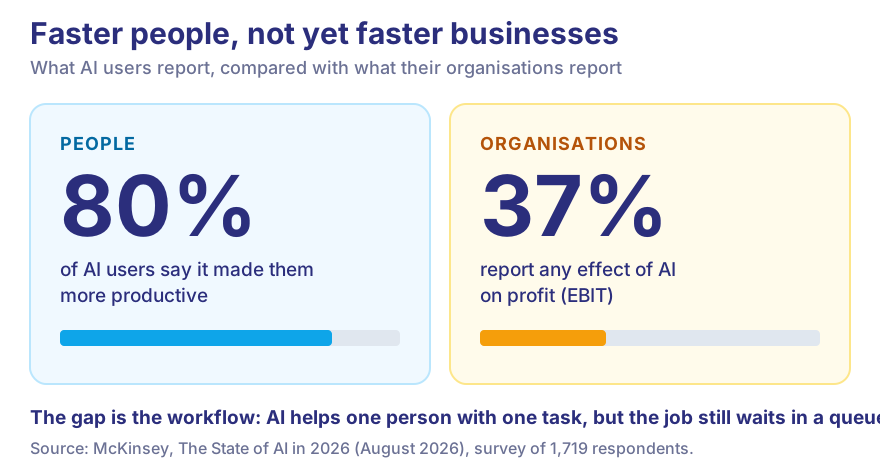
A faster employee is not a faster business. AI business automation closes that gap. Instead of helping someone read an invoice quicker, it takes the whole job off the desk — the reading, the checking, the typing, the routing — and leaves a person only the cases that need judgement.
At Vidyayatan we build these systems for clients. Here is how they work, what they cost, and where they are the wrong answer.
Have a repetitive process you want gone? Talk to Vidyayatan's AI experts.
What is AI business automation?
AI business automation means using artificial intelligence to run business tasks that used to need a person, because the input was too messy for a fixed rule.
Traditional automation follows rules. If a customer submits a form, send an email. It is fast, cheap and completely literal. Give it an enquiry in Hinglish or a scanned invoice at an angle, and it has nothing to hold on to.
AI-powered automation reads. The model works out what the customer wants, pulls out name, product and budget, sorts the lead, and suggests who should call back. It works on documents, images, emails and chats — anything a person currently reads before they can act on it.
Why businesses are adopting it now
Language models got good enough to read ordinary business documents, and cheap enough to run on every one. Stanford's AI Index found the cost of a GPT-3.5-level answer fell 280-fold between late 2022 and late 2024.
Meanwhile the pressure is familiar. Hours of copy-paste between systems. Customers who expect a reply in minutes. Every jump in orders seems to need another hire.
The real case is not "efficiency" in the abstract. It is growth that doesn't grow the back office at the same rate.
Which business operations can be automated with AI?
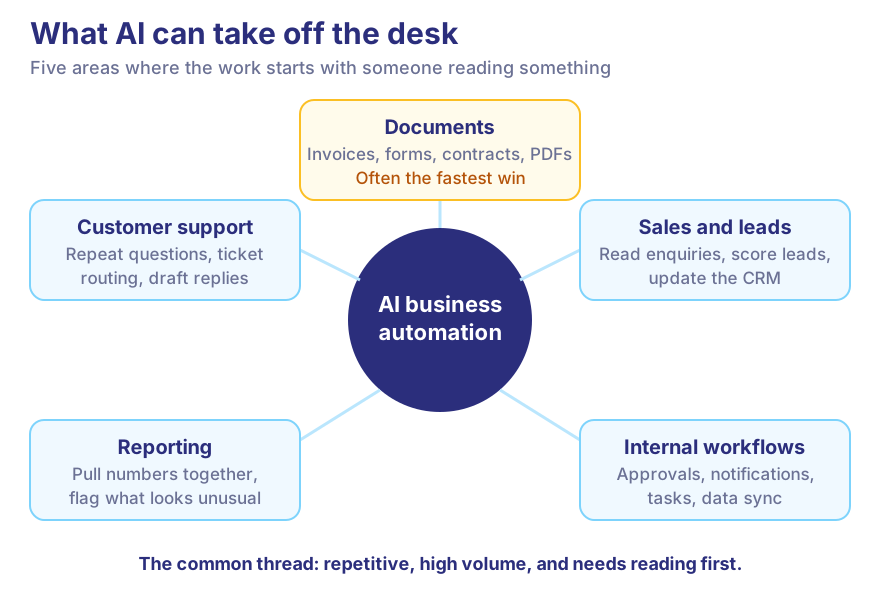
Customer support
Answering repeat questions, routing tickets, and drafting replies an agent approves with one click.
Sales and lead management
Reading every enquiry, scoring leads, updating the CRM and triggering follow-ups, so sales calls the best leads first.
Document processing
Extracting data from invoices, applications, contracts, forms and PDFs, and checking it against your records. Usually the fastest win.
Business reporting
Pulling numbers from several systems, summarising what changed and flagging anything unusual.
Internal workflows
Approvals, notifications, task assignment, data sync, and the employee requests that now travel by email and memory.
AI business automation examples
| Business function | The manual way | With AI business automation |
|---|---|---|
| Sales | Someone reads every enquiry | AI sorts and scores enquiries, CRM updated automatically |
| Customer support | Agents answer the same questions daily | AI drafts answers; agents handle the hard ones |
| Finance | Invoice data typed in by hand | AI extracts, checks and posts invoice data |
| HR | Every application read in full | AI shortlists against the role; a person decides |
| Operations | Monthly report built by hand | Report generated and summarised automatically |
| Education | Content tagged and organised manually | AI tags, structures and links course content |
| Marketing | Research collated from many tabs | AI gathers and summarises research for review |
AI business automation vs traditional automation
| Traditional automation | AI business automation |
|---|---|
| Follows fixed rules | Interprets what the input means |
| Needs structured data | Handles structured and unstructured data |
| Breaks on unexpected input | Copes with variation, flags what it can't |
| Best for predictable tasks | Best for tasks that need reading or judgement |
| Cheap to run | Costs more per task |
The two are not rivals. In most systems we build, AI does the reading and plain rules do everything after that. Rules are cheaper, faster and easier to audit.
How Vidyayatan approaches AI business automation
We don't start with a model. We start with the process as it runs today.
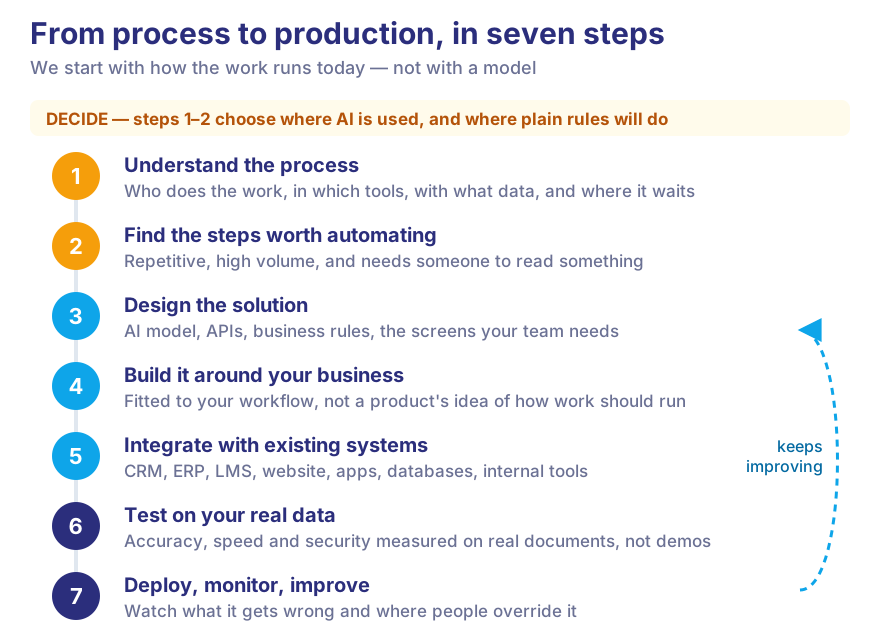
Step 1 — Understand the business process
Who does the work, in which tools, with what data, and where it waits. The bottleneck is often not where people say it is.
Step 2 — Identify automation opportunities
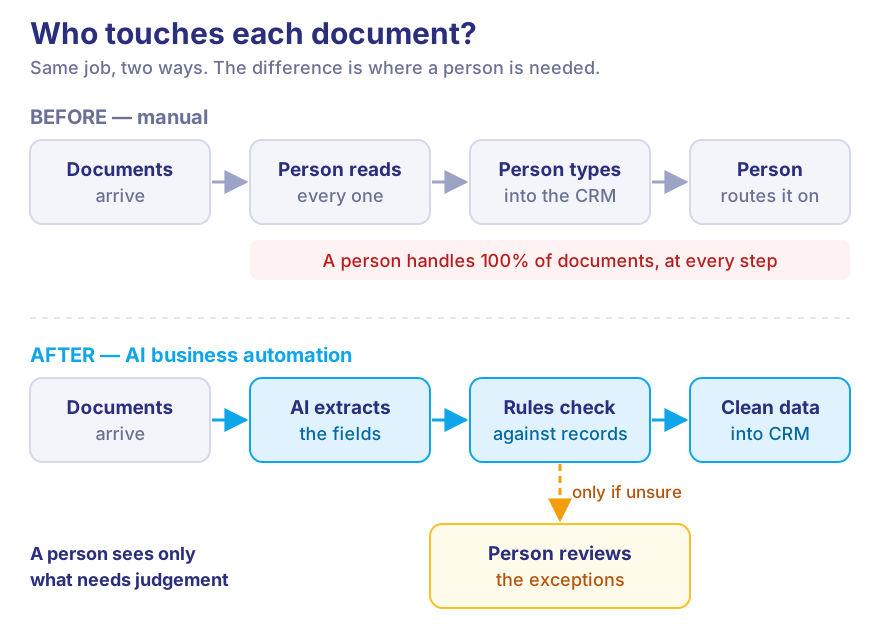
Not every step needs AI. We look for steps that are repetitive, high volume, and need someone to read something. A common one:
Before: an employee opens hundreds of documents, finds the fields and types them into the CRM.
After: AI extracts the fields, rules check them against existing records, and clean data flows on. A person sees only the documents the system wasn't sure about.
Step 3 — Design the solution
Which AI model, which APIs, what business rules, and what screens the team needs.
Step 4 — Build it around your business
We build to fit your workflow, not a product's idea of how work should run. That is the main reason to choose custom software over an off-the-shelf tool.
Step 5 — Integrate with existing systems
Automation is only useful when it connects to where your data lives: CRM, ERP, LMS, website, mobile apps, databases and internal tools.
Step 6 — Test and tune
Accuracy is measured on your real documents, not demo data, along with speed, security and whether the team actually finds it easier.
Step 7 — Deploy, monitor, improve
Once it is live, we watch what it gets wrong and where people override it. It improves because someone is looking.
Our longest-running example is HABUILD, a fitness community with 20 lakh+ users. We automated its live sessions — unique links per member, automatic attendance, zero manual link creation — and its WhatsApp messaging. Honestly, most of that system is plain rules, not AI. That is the point of Step 2: use AI only where it is needed.
Where AI automation helps by industry
Education
Student queries, content organisation, assessments and admin. See our EdTech work.
Finance
Document processing, customer queries and reporting, with the audit trail fintech needs.
Healthcare
Admin, documents and appointment messages. Clinical decisions stay with clinicians. See HealthTech.
SaaS
Support, onboarding, usage analysis and AI features inside the product.
E-commerce
Support, product data clean-up, order updates and leads.
How much does AI business automation cost?
There is no single price. Anyone who quotes one before seeing your workflow is guessing. Cost depends on:
- the number of workflows, and how messy their inputs are
- the AI model, and monthly document or message volume
- integrations, security and data-handling requirements
- custom screens, hosting and ongoing maintenance
Running costs are real. In the same McKinsey survey, about one in five organisations said AI operating costs already limit their use. We design for that from day one: smaller models where they do the job, rules wherever a rule will do.
And a caution. Gartner expects over 40% of agentic AI projects to be cancelled by the end of 2027, over cost, unclear value and weak risk controls. The survivors usually started small, on one process, with a number to beat.
Want an estimate for your process? Get an AI automation consultation: share how the work runs today and talk it through with an engineer.
The AI automation opportunity checklist
Answer these before you talk to anyone, including us.
- Pick one repetitive process. One. Not "operations".
- Estimate the manual hours it takes each week, and who spends them.
- List the data sources: where the documents, messages or numbers come from.
- List the software involved: CRM, ERP, spreadsheets, email.
- Note the integrations needed: where the result must end up.
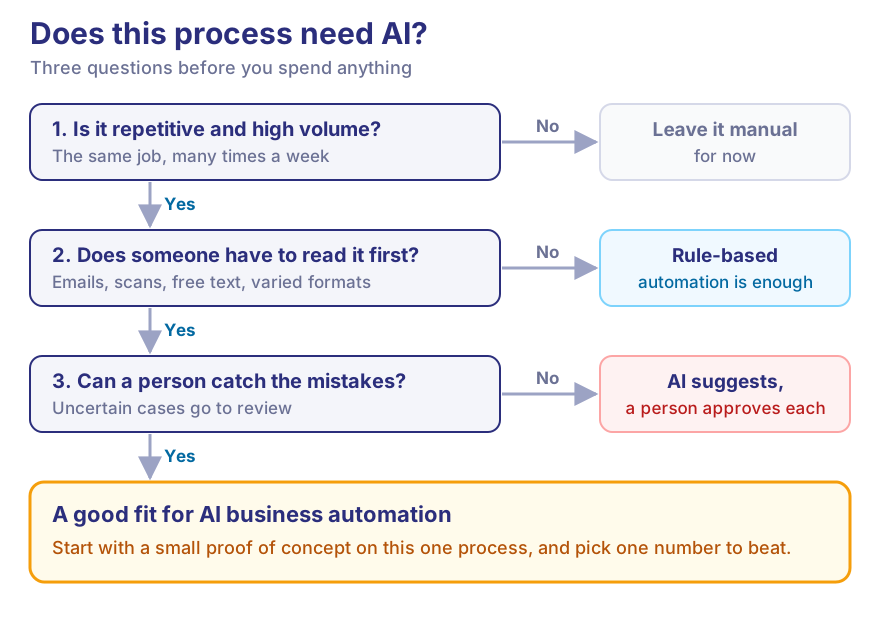
- Ask whether it needs AI at all. If every input looks the same, a rule may be enough.
- Judge the complexity: how varied the inputs are, and what a mistake costs.
- Define success: hours saved, response time or error rate. Pick one number.
Then build a small proof of concept, test it on real data, connect it to the wider process, and keep improving it. Our guide to building an AI strategy covers the bigger picture.
Why businesses work with Vidyayatan for AI solutions
We are a software engineering company, not an AI reseller. Most of an automation project is ordinary engineering — integrations, data, security, interfaces — around a model.
What we bring: custom AI development and LLM integration, web application and mobile app development, custom and SaaS software, API integration, cloud and DevOps, and dedicated developers for ongoing product work. For more ideas, read generative AI use cases beyond chatbots.
Frequently asked questions
What is AI business automation?
Using AI to run tasks that need someone to read information first — enquiries, documents, emails — and passing the result into your workflow automatically.
What business processes can AI automate?
Support, lead handling, document and invoice processing, reporting and internal requests. The best candidates are repetitive, high volume and involve reading.
How does AI automation work?
An AI model turns incoming information into structured data. Business rules check it and act on it. Anything uncertain goes to a person.
How much does AI business automation cost?
It depends on the workflows, data volume, model and integrations. A proof of concept on one process gives you a real figure before you commit more.
Can AI automation integrate with existing software?
Yes. Connecting to your CRM, ERP, LMS and databases is usually most of the work.
Is AI automation suitable for small businesses?
Often, if one process eats a lot of hours. For simple, predictable tasks an off-the-shelf tool may be enough, and we will say so.
How long does AI automation implementation take?
A focused proof of concept on one process usually takes weeks. Wider rollouts depend on how many systems and teams are involved.
What is the difference between AI automation and traditional automation?
Traditional automation follows fixed rules on tidy data. AI can interpret messy input like emails and scans. Good systems use both.
How can Vidyayatan help businesses implement AI automation?
We map your process, find the steps worth automating, then build, integrate and support the system, as a project or with a dedicated team.
Automate your business with AI
You don't need to automate everything at once. You need one process, measured honestly, and a system that takes it off someone's desk.
That is how AI business automation pays: not by making each person a bit faster, but by removing whole jobs from the queue. Vidyayatan can help you find that first process, build the solution and connect it to the systems you already run.
Have a business process you want to automate? Talk to Vidyayatan's AI experts.