

Twenty thousand UK civil servants were given an AI assistant for three months in late 2024. On average, they said it saved them 26 minutes a day.
A separate team at the UK's Department for Business and Trade ran its own trial with 1,000 staff. Its evaluation found small time savings too. But it also found something else: no evidence that the time saved made the department more productive.
Both can be true. So where did your team's week go? For most businesses, too much of it goes on copy-paste. AI automation can give those hours back. But saving time and saving money are not the same thing. That gap is what this post is about: how AI automation for business actually lowers costs, where it doesn't, and how to check which one is happening to you.
What is AI automation for business?
Picture a shop that sells kitchenware online. A customer sends a WhatsApp message: "Pressure cooker came with a cracked lid, need a new one before Sunday, order from last week."
Old-style automation can reply "Thanks, we've received your message." Someone still has to read it, find the order and decide what to do.
AI automation reads it the way a person would. It spots a damaged item, finds last week's order, checks the stock and books a replacement. The AI understands the message, and simple rules handle the rest. That, in plain terms, is AI automation for business: software that can understand the messy stuff, joined to rules that act on it.
| Traditional automation | AI automation | |
|---|---|---|
| How it works | Rule-based: "if this, then that" | AI-driven: works out what the input means |
| What it can handle | Only the workflows it was set up for | Messages, documents and requests it hasn't seen before |
| Changing over time | Stays the same until someone reprograms it | Gets better as it learns from more of your data |
| Replies | The same fixed reply every time | A reply that fits the situation |
| Data it needs | Neat forms and spreadsheets | Also emails, PDFs, photos and voice notes |
If you want the basics in more depth, our earlier post on AI business automation covers them. This one is about the money.
Where the cost savings actually come from
Repetitive tasks
Data entry, reading documents, weekly reports, the same follow-up email for the fortieth time. These jobs eat hours, need little judgement, and are the easiest to measure.
Less manual work
Every task an AI picks up is time a person gets back. That time only becomes a saving if it goes somewhere useful: more customers handled, a backlog cleared, or a hire you no longer need to make.
Fewer errors
A tired person mistypes an invoice number at 6 p.m. Finding and fixing that mistake later often costs more than the typing did.
Work that doesn't stop at 6 p.m.
An automated workflow runs at night and on Sundays, so the team starts Monday with less waiting for them.
How it improves productivity
The best evidence comes from a study of 5,179 customer support agents by researchers at Stanford and MIT. With an AI assistant, agents resolved 14% more issues per hour on average. New and less experienced agents improved by 34%. The most experienced barely changed.
That second finding matters for a business owner. AI helps most where people are still learning, because it spreads the know-how of your best staff to everyone else. Day to day, it shows up as faster replies to customers, fewer hand-offs between teams, and reports that are ready when the decision is being made, not a week later.
A worked example: invoice processing
Take one process and do the sum. The numbers below are made up to show the method. Swap in your own.
A finance team handles 1,200 invoices a month. Typing each one into the accounts system takes about 6 minutes. That's 120 hours a month.
With AI automation, the system reads each invoice and fills in the details. A person spends a minute checking each one. About one in five still needs a proper look, because a figure is unclear or a supplier is new. So:
- 1,200 quick checks at 1 minute = 20 hours
- 240 closer looks at 6 minutes = 24 hours
- Total: 44 hours a month. That's 76 hours saved.
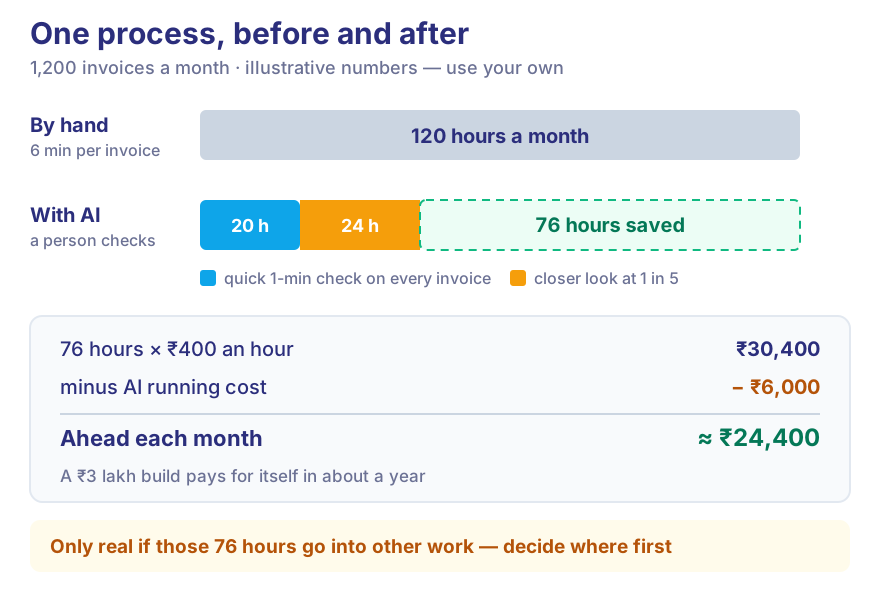
If your team's time costs ₹400 an hour, all in, that is ₹30,400 a month. Take off the running cost of the AI, say ₹6,000 a month, and you're about ₹24,400 ahead. If building it cost ₹3 lakh, it pays for itself in about a year.
Now the honest part. Those 76 hours only become ₹24,400 if they go into other work. If the team simply has a quieter week, you've spent money and saved nothing. Decide before you build what the freed time will be used for.
Business processes you can automate with AI
Here's where the cost usually hides in each part of a business, and what AI takes off it.
| Business process | AI automation example | Where the saving shows up |
|---|---|---|
| Customer support | AI chatbots and virtual assistants | Fewer repeat questions reach your team |
| Sales | Lead qualification and follow-ups | Sales calls only the leads worth calling |
| Marketing | Content and campaign automation | Drafts and reports in minutes, not days |
| Finance | Invoice and document processing | Less typing, fewer payment mistakes |
| HR | Candidate screening and employee queries | Shortlists ready faster; fewer "how many leaves do I have?" emails |
| Operations | Workflow automation | Less chasing and waiting between teams |
| Data management | Data extraction and classification | Clean data without a weekly clean-up job |
Use cases across industries
- EdTech: In admission season the same fee questions arrive hundreds of times a day. An assistant answers them, checks practice tests and suggests what each student should revise.
- Healthcare: Automated appointment reminders and replies free the front desk for the patients standing in front of it.
- FinTech: Loan applications come with a pile of KYC documents. AI reads and cross-checks them, and flags transactions that don't match a customer's usual pattern.
- Agritech: AI turns weather, soil and crop data into simple advice, like when to water or when to sell.
- Manufacturing: Delays usually surface when an order is already late. Automated monitoring spots a stalled step while there's still time to fix it.
How to implement AI automation in your business
Don't move to the next step until you can answer the question in the last column.
| Step | What to do | Ready to move on when you can say… |
|---|---|---|
| 1. Identify repetitive processes | Ask each team to list the tasks they repeat more than 20 times a week | "Here are our ten most repeated tasks" |
| 2. Analyse automation opportunities | Pick one with high volume and a clear "right answer" | "This one task costs us X hours a month" |
| 3. Select the right AI technology | Match the tool to the job. Sometimes a simple rule is enough | "We know why this needs AI, or why it doesn't" |
| 4. Integrate with existing software | Connect it to your CRM, accounts system or database | "Nobody has to copy anything across by hand" |
| 5. Test and monitor the workflow | Run it next to your team for a few weeks | "It gets at least as much right as we do" |
| 6. Measure ROI and improve | Compare against your starting numbers | "It saved this much, and here's what we did with the time" |
The challenges, honestly
In July 2024, Gartner predicted that at least 30% of generative AI projects would be abandoned after the pilot stage by the end of 2025. The reasons it gave were poor data quality, weak risk controls, rising costs and unclear business value. Most of those can be avoided with planning.
- Data privacy. India's DPDP Rules were notified in November 2025, and the main duties apply from May 2027. If your automation touches customer data, plan for consent and security now. Our DPDP post explains what's involved.
- Old systems. Connecting to older software is often the slowest part.
- Upfront cost. You pay before you save. Start with one process, not ten.
- Your team. People won't use a tool they don't trust. Involve them early.
- Accuracy. AI makes mistakes, so someone checks its work, especially at first.
- The wrong process. Automating something rare saves nothing.
And watch you don't cut too far. In 2025, Klarna's CEO said that cost had been "a too predominant evaluation factor" in its AI customer service, and the company started investing in human support again.
How to measure the ROI of AI automation
Measure before you start, or you'll have nothing to compare against. Track these:
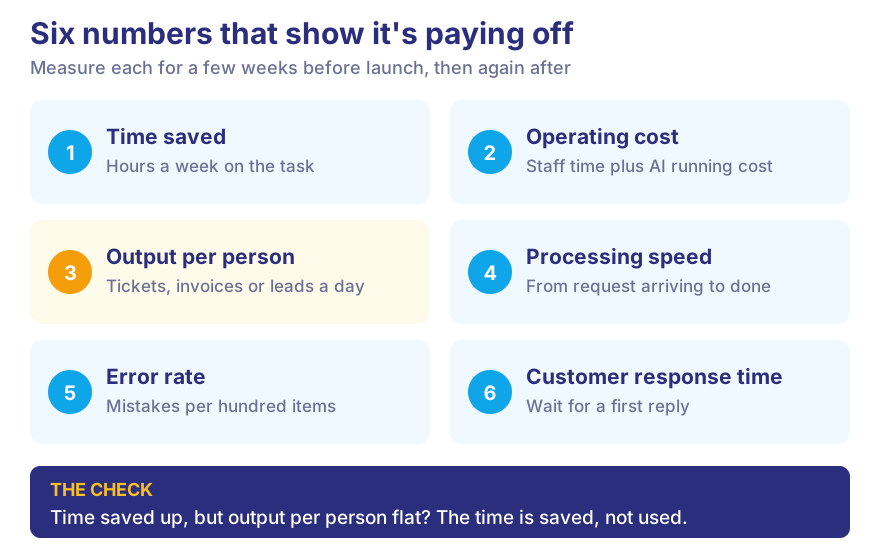
- Time saved: hours per week on the task, before and after.
- Operating cost: staff time plus the AI's running cost.
- Output per person: tickets, invoices or leads handled each day.
- Processing speed: time from a request arriving to it being done.
- Error rate: mistakes found per hundred items.
- Customer response time: how long people wait for a first reply.
If time saved goes up but output per person stays flat, you've found the gap from the UK trial. The time is being saved. It isn't being used.
What's next for AI automation
AI agents will take on whole tasks, like chasing an unpaid invoice from first reminder to payment, though they'll need close watching for a while yet. Reports will explain themselves: not just "sales dropped" but which region and why. And, as at September 2026, the most dependable change is the quietest one: AI arriving inside the CRM, accounts and helpdesk software you already pay for, with no separate project needed.
Conclusion
AI automation for business works when it's aimed at the right job. Pick work that is repetitive, high in volume and easy to check. Measure it before and after. Most importantly, decide in advance what your team will do with the time it frees up. Do that, and you cut repetitive work, lower your running costs and grow without the back office growing at the same rate.
At Vidyayatan, we build AI automation around the way a business already works, and we'll tell you when a simple rule would do the job instead. Have a process that eats your team's week? Talk to us.